Struggling with visibility? Learn how to get your website indexed by Google with our guide on Google Search Console, technical SEO, and site structure.
February 1, 2026 (8mo ago)
How to Get Your Website Indexed by Google Fast
Struggling with visibility? Learn how to get your website indexed by Google with our guide on Google Search Console, technical SEO, and site structure.
← Back to blog
How to Get Your Website Indexed by Google Fast
Summary: Struggling with visibility? Verify your site in Google Search Console, submit an XML sitemap, fix technical blockers, and use engagement signals to speed indexing.
Introduction
Struggling with visibility? If your site isn’t showing up in Google, the fastest fixes are usually verification in Google Search Console, submitting an XML sitemap, and using the URL Inspection Tool for priority pages. This guide walks through those steps, the common technical issues that block indexing, and tactics to get Google to crawl your content faster.
So, you want to get your website indexed by Google?
The quickest path is to verify your site in Google Search Console, hand Google your XML sitemap, and point it directly to your most critical pages using the URL Inspection Tool. If you need to jump to the Console section, see “Getting Friendly With Your Google Search Console Toolkit.”
Why Is My Website Invisible on Google and How Do I Fix It?
There’s a special kind of frustration that comes from launching a website you’ve poured your heart into, only to find it’s a ghost on Google. You type your business name, hit enter, and… crickets. It’s an incredibly common problem that usually boils down to a communication gap between your site and Google’s crawlers.
First, run a quick check. Go to Google and type site:yourdomain.com into the search bar. If a list of pages appears, you’re indexed — the problem is ranking, not indexing. If you see “did not match any documents,” your site is invisible to Google. The cause could be a brand-new domain that Google hasn’t discovered yet or a technical setting that’s telling search engines to stay away.
Take Control with Google Search Console
Think of Google Search Console (GSC) as mission control for search visibility. It’s free and essential. Verifying ownership in GSC unlocks tools to submit sitemaps, request indexing for pages, and get alerts about technical problems. Trying to fix indexing without GSC is like flying blind.
Understanding the Core Principles
To solve indexing problems, know the basics. Google discovers and indexes content based on four core areas: technical SEO, on-page SEO, off-page signals (backlinks), and content quality. Fixing these areas prevents most indexing issues.
The Four Pillars of Google Indexing
| Pillar | What It Is | Why It Matters |
|---|---|---|
| Technical SEO | Site health: crawlability, speed, mobile-friendliness | If Googlebot can’t access and read your site, pages won’t enter the index. |
| On-Page SEO | Keywords, headings, structured content | Helps Google understand what each page is about so it’s indexed for the right queries. |
| Off-Page SEO | Backlinks and external authority | Backlinks are votes of confidence that help Google prioritize crawling and indexing. |
| Content | Valuable, original content that serves users | High-quality content attracts users and links, signaling importance to Google. |
A quick site audit is a great first step to spot hidden roadblocks. If you want to analyze crawler behavior in depth, review your server log files to see every visit from Googlebot.
Key takeaway: Most visibility problems are solvable. Start by figuring out whether Google can discover your site, whether crawlers can access it, and whether any technical settings are blocking indexing.
Getting Friendly With Your Google Search Console Toolkit

Google Search Console is your direct line to Google. Once verified, two features you’ll use constantly are Sitemaps and the URL Inspection Tool. These aren’t “set and forget.” Use them when you launch new content or update important pages.
Submitting a Sitemap: Your Site’s Official Roadmap
An XML sitemap lists important pages and shows how content is organized. Submitting it tells Google where to look first.
How to submit a sitemap in GSC:
- Go to the Indexing section in the left menu.
- Click Sitemaps.
- Paste the URL of your sitemap (often
sitemap.xmlorsitemap_index.xml) into “Add a new sitemap.” - Click Submit.
GSC will report success or show errors (like URLs blocked by robots.txt). Fix those issues and resubmit.
Expert tip: Use log file analysis for a deeper view of how Googlebot interacts with your site.
The URL Inspection Tool: Your Go-To for Quick Action
The URL Inspection Tool shows page-level data from Google’s index. It tells you whether a URL is indexed, whether Google can crawl it, and whether there are mobile or structured-data issues. Use the “Request Indexing” button to add important pages to Google’s priority crawl queue. It’s not an instant guarantee, but it speeds discovery.
When to Use These Tools
- New product pages: Add the URLs to your sitemap, then request indexing for the main page first.
- High-value guides and tools: Inspect and request indexing immediately after publishing.
- Major page updates: Use Request Indexing to signal the new value to Google.
Clearing the Path for Google’s Crawlers
If a page isn’t indexed, the problem is often a technical blocker. A single line of code can keep Google away even if the page looks fine to human visitors. Check the following regularly.
The Overly Cautious robots.txt File
Robots.txt tells crawlers which areas to ignore. A common fatal mistake is:
User-agent: *
Disallow: /
That single slash blocks everything. Check yourdomain.com/robots.txt and fix any blocking rules.
Sneaky On-Page “noindex” Tags
A meta robots tag like <meta name="robots" content="noindex"> prevents a page from being added to the index. It’s useful for thank-you pages, but it can be accidentally left on important pages after a redesign. Check the page source for “noindex.”
Confusing Canonical Tags
Canonical tags resolve duplicate content, but misconfigurations can tell Google the wrong page is the primary one. Ensure canonical URLs point to the correct canonicalized version.
Key insight: Your site can look perfect to visitors but still be invisible to Google because of a tiny technical setting. Regular audits of robots.txt, noindex tags, and canonicals are essential.
Also remember Google assigns a crawl budget based on site authority and traffic, so sites with lower authority may be crawled less frequently.
Boosting Indexing Speed with Quality and Engagement Signals
Getting indexed is the first step; getting indexed fast is the competitive advantage. After technical basics are fixed, speed of indexing depends on priority signals: quality content, engagement metrics, and backlinks.
Interactive content and tools dramatically increase time-on-page and reduce bounce rates, which tell Google your page deserves attention. For example, embedding a useful estimator on a services page can turn passive visitors into active users.
Examples of useful embeddable tools include Business Valuation Estimator and Mortgage Calculator. These kinds of pages often attract backlinks and engagement that accelerate indexing.
Key takeaway: Turn static pages into interactive resources to improve dwell time, lower bounce rates, and attract backlinks — all of which encourage faster indexing.
Why Engagement Accelerates Indexing
- Increased dwell time: Interactive tools make users stay longer, a positive signal for Google.
- Reduced bounce rate: Users who interact are less likely to leave immediately.
- Higher backlink potential: Unique, useful tools become linkable assets.
If you want more tactics to increase engagement, review your page layout, calls to action, and content clarity.
Designing a Site Structure That Google Loves
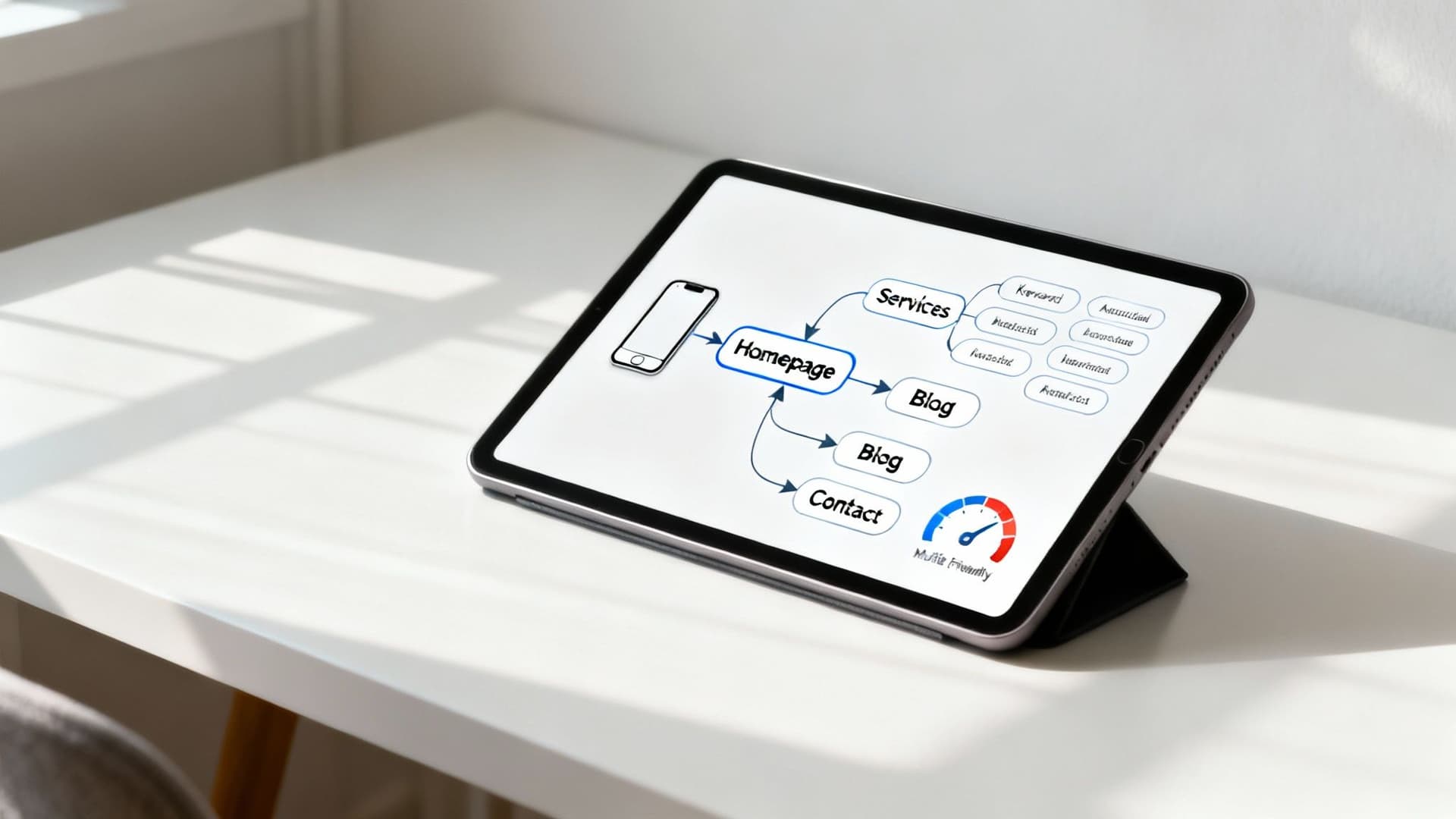
Googlebot is like a visitor in a large warehouse. If there are no clear aisles or signs, it’ll wander and leave. A logical site architecture improves crawl efficiency and helps Google understand which pages are most important.
The Power of Smart Internal Linking
Internal links guide both users and crawlers. New pages should be linked from existing, authoritative pages so Google can discover them. Topic clusters — a pillar page with supporting cluster pages — create clear topical authority and improve indexing for the whole group.
Clean URLs and a Mobile-First Mindset
Use descriptive, human-readable URLs:
- Bad:
yourdomain.com/index.php?category=123&product_id=5678 - Good:
yourdomain.com/widgets/blue-widget-pro
Google now uses mobile-first indexing, so ensure the mobile version of your site contains the same critical content and structured data. Page speed matters: slower pages see higher bounce rates, which negatively affects indexing and ranking.1
Key takeaway: A well-designed site structure, clean URLs, and mobile performance are central to fast, accurate indexing.
Best Practices for a Crawlable Site Structure
- Build a logical hierarchy from broad to specific topics.
- Use descriptive anchor text for internal links.
- Optimize page speed, especially on mobile.
- Ensure every important page has at least one internal link.
Your Common Google Indexing Questions Answered
Why are some pages indexed but others are not?
Common reasons:
- Crawl priority: Google prioritizes pages it thinks are important (internal links, backlinks, engagement).
- Content quality: Thin or duplicate content may be crawled but not indexed.
- Orphaned pages: Pages with no internal links are hard for Google to find.
How long should I wait for a new page to get indexed?
It varies. New websites can take days to weeks; established sites with authority can see indexing in hours to days. If a page is still unindexed after a month, start troubleshooting technical issues and content quality.
What if Requesting Indexing in GSC does nothing?
The Request Indexing feature queues the URL for a priority crawl but doesn’t guarantee indexing. If requests don’t work, improve the page’s content, internal links, and technical health before trying again.
Quick Decision Tree for an Unindexed Page
- Check robots.txt and “noindex” tags.
- Verify the page is in your XML sitemap.
- Ensure the page has internal links from authoritative pages.
- Use the URL Inspection Tool to see crawl errors and request indexing.
- Improve content quality and engagement signals if needed.
Three Concise Q&A Sections
Q: What’s the first thing I should do if my site isn’t indexed?
A: Verify your site in Google Search Console and submit an XML sitemap. Then use the URL Inspection Tool for priority pages.
Q: How do I know if a technical issue is blocking indexing?
A: Check robots.txt, search page source for “noindex”, and confirm canonical tags point to the correct URL. Use GSC to surface crawl or indexing errors.
Q: Can I speed up indexing for all pages at once?
A: Focus on publishing high-quality content, improving internal linking, and earning backlinks. Adding interactive, useful pages can increase engagement and help Google prioritize your site.
1.
Think with Google, “Find out how micro-moments are reshaping mobile,” https://www.thinkwithgoogle.com/consumer-insights/consumer-trends/mobile-page-speed-new-industry-benchmarks/
Ready to Build Your Own Tools for Free?
Join hundreds of businesses already using custom estimation tools to increase profits and win more clients
✨ No coding required • 🚀 Ready in minutes • 💸 Free to create